מחיצת שולחן Haworth Belong - משפחת Revit
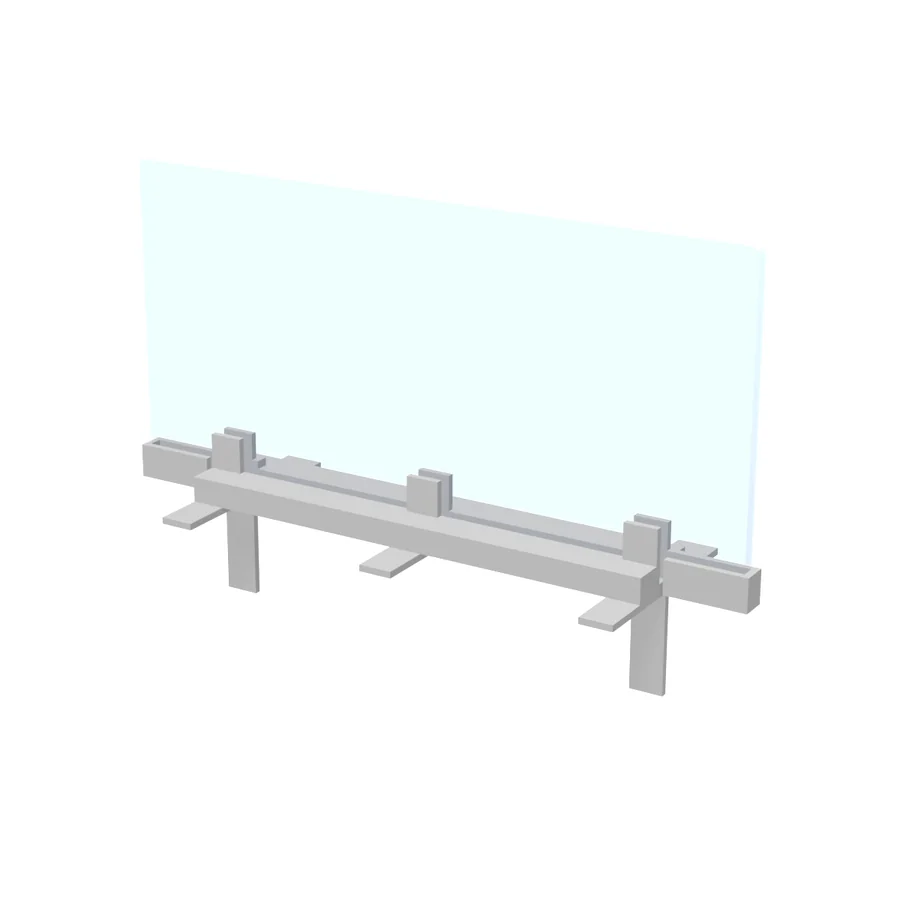
מחיצת שולחן Haworth Belong היא משפחת רוויט תלת-ממדית ברוחב 62 ס"מ, עומק 20 ס"מ וגובה 41 ס"מ. בקובץ 4 טיפוסים.
פרטי המשפחה
| רוחב × עומק × גובה | 62×20×41 ס"מ |
|---|---|
| שינוי מידות | כן, דרך Edit Type |
| החלפת חומר וצבע | כן |
| קטגוריה ברוויט | Furniture Systems (מערכות ריהוט) |
| אופן הצבה | מוצבת על מפלס (רצפה), בלי מארח |
| נשארת אנכית | כן, גם על משטח משופע |
| משפחה משותפת (Shared) | לא |
| טיפוסים בקובץ | 4 |
| יחידות הקובץ | Fractional inches |
| פורמט וגודל | RFA · 304 KB |
| שם מקורי | Haworth Belong-Screen |
| שם הקובץ | Haworth_Belong-Screen.rfa |
פרמטרים
| פרמטר | סוג | Center Screen | Full Modesty or Structural L Screen | Territory Screen | Back or End Screen |
|---|---|---|---|---|---|
| מידות | |||||
| Actual Height = if(Height > Max. Height, Max. Height, if(Height < Min. Height, Min. Height, Height)) | טיפוס | 14" | 42" | 12" | 27" |
| Actual Mounting Height = if(Territory Screen, Worksurface Height, if(and(Full Modesty or Structural L Screen, Worksurface Height < 30"), 30" - Worksurface Thickness, Worksurface Height - Worksurface Thickness)) | טיפוס | 27 13/16" | 28 13/16" | 29" | 27 13/16" |
| Actual Width = if(Width > Max. Width, Max. Width, if(Width < Min. Width, Min. Width, Width)) | טיפוס | 60" | 48" | 24" | 60" |
| Custom Size = if(Back or End Screen, not(and(or(Width = 24", Width = 30", Width = 36", Width = 42", Width = 48", Width = 54", Width = 60"), or(Height = 19", Height = 27"))), if(Center Screen, not(and(or(Width = 24", Width = 30", Width = 36", Width = 42", Width = 48", Width = 54", Width = 60", Width = 66", Width = 72", Width = 78", Width = 84", Width = 90", Width = 96"), or(Height = 14"))), if(Full Modesty or Structural L Screen, not(and(or(Width = 24", Width = 30", Width = 36", Width = 42", Width = 48"), or(Height = 42", Height = 50"))), not(and(or(Width = 24"), or(Height = 12")))))) | טיפוס | ||||
| Height | טיפוס | 14" | 42" | 12" | 27" |
| Width | טיפוס | 60" | 48" | 24" | 60" |
| Worksurface Height | טיפוס | 29" | 30" | 29" | 29" |
| אילוצים | |||||
| Actual Bottom of Glass Height = if(and(Back or End Screen, Actual Height = 19"), Actual Mounting Height - 13", if(and(Back or End Screen, Actual Height = 27"), Actual Mounting Height - 13", if(Territory Screen, Actual Mounting Height, if(and(Full Modesty or Structural L Screen, Actual Height = 42"), Actual Mounting Height - 28", if(and(Full Modesty or Structural L Screen, Actual Height = 50"), Actual Mounting Height - 28", Actual Mounting Height))))) | מופע | 27 13/16" | 13/16" | 29" | 14 13/16" |
| Default Elevation | טיפוס | 0" | 0" | 0" | 0" |
| Size = "Verify Final Dim. w/ Haworth" | טיפוס | Verify Final Dim. w/ Haworth | Verify Final Dim. w/ Haworth | Verify Final Dim. w/ Haworth | Verify Final Dim. w/ Haworth |
| Standard Heights = if(Center Screen, "14 in.", if(Territory Screen, "12 in.", if(Full Modesty or Structural L Screen, "42 or 50 in.", "19 or 27 in."))) | טיפוס | 14 in. | 42 or 50 in. | 12 in. | 19 or 27 in. |
| חומרים וגימור | |||||
| Bracket Finish | טיפוס | Haworth - Metal - Brushed Aluminum | Haworth - Metal - Brushed Aluminum | Haworth - Metal - Brushed Aluminum | Haworth - Metal - Brushed Aluminum |
| Screen Finish | טיפוס | Haworth - Glass - Clear | Haworth - Glass - Clear | Haworth - Glass - Clear | Haworth - Glass - Clear |
| נתוני זיהוי | |||||
| Assembly Code | טיפוס | E2020200 | E2020200 | E2020200 | E2020200 |
| Model = "Haworth_Belong-Screen" | טיפוס | Haworth_Belong-Screen | Haworth_Belong-Screen | Haworth_Belong-Screen | Haworth_Belong-Screen |
| Revision Number = "2" | טיפוס | 2 | 2 | 2 | 2 |
| גרפיקה | |||||
| Back or End Screen = not(or(Center Screen, Territory Screen, Full Modesty or Structural L Screen)) | טיפוס | ||||
| אחר | |||||
| Bracket Offset = 3" | טיפוס | 3" | 3" | 3" | 3" |
| Bracket Spacing = Actual Width - 10" | טיפוס | 50" | 38" | 14" | 50" |
| Max. Height = if(Center Screen, 14", if(Territory Screen, 12", if(Full Modesty or Structural L Screen, 50", 27"))) | טיפוס | 14" | 50" | 12" | 27" |
| Max. Width = if(Center Screen, 96", if(Territory Screen, 24", if(Full Modesty or Structural L Screen, 48", 60"))) | טיפוס | 96" | 48" | 24" | 60" |
| Middle Bracket = and(Center Screen, Width > 59") | טיפוס | ||||
| Min. Height = if(Center Screen, 14", if(Territory Screen, 12", if(Full Modesty or Structural L Screen, 42", 19"))) | טיפוס | 14" | 42" | 12" | 19" |
| Min. Width = 24" | טיפוס | 24" | 24" | 24" | 24" |
| Panel Bottom Offset = if(or(Territory Screen, Center Screen), 1/4", 0") | טיפוס | 1/4" | 0" | 1/4" | 0" |
| Screen Depth = if(Full Modesty or Structural L Screen, 1 1/2", 1/2") | טיפוס | 1/2" | 1 1/2" | 1/2" | 1/2" |
| Worksurface Thickness = 1 3/16" | טיפוס | 1 3/16" | 1 3/16" | 1 3/16" | 1 3/16" |
חומרים
זכוכית (Clear)
פרמטר: Screen Finish
אלומיניום (Brushed Aluminum)
פרמטר: Bracket Finish
הורדה
הורדת קובץ RFA- קובץ RFA
- 4 טיפוסים בקובץ אחד
איך טוענים ומציבים
- מורידים את קובץ ה-RFA.
- ברוויט:
Insert›Load Family, או גוררים את הקובץ לחלון הפרויקט. - מציבים עם
Component(CM). מקש רווח מסובב את המשפחה לפני ההצבה. - בוחרים טיפוס ומידה ברשימה שבראש חלון Properties.
שאלות על המשפחה
איך מחליפים את החומר או הצבע?
בוחרים את המשפחה בפרויקט, ובחלון Properties לוחצים על Edit Type. ליד פרמטר החומר לוחצים על הערך ובוחרים חומר אחר מספריית החומרים. אם החומר לא מופיע שם, פותחים את המשפחה בעורך (Edit Family) ומשנים אותו שם.
האם המשפחה תופיע ברשימת כמויות (Schedule)?
כן. היא בקטגוריה Furniture, ולכן תופיע ברשימת כמויות של ריהוט.
עוד עמדות עבודה

אריח מסילה לפאנל Herman Miller Action Office A3615

הגבהה אחורית למשטח Herman Miller CoStruc

חלון זכוכית דק למחיצה Herman Miller Canvas

מודול מסגרת מעבר Herman Miller CoStruc

מודול מסגרת נמוך Herman Miller CoStruc

מסגרת מחיצה Herman Miller Canvas FT110

מסגרת מחיצה Herman Miller Ethospace E1109

מסילת מתאם Herman Miller CoStruc